1
/
of
9
SUIDEK
SUIDEK HDMI Displayport KVM Switch 2 Monitors 2 Computers - 4K@60Hz Aluminum with 3 USB 3.0 Ports Audio & Microphone Ports Share Dual Monitors Keyboard Mouse Printer - 2 USB Cable Controller Adapter
SUIDEK HDMI Displayport KVM Switch 2 Monitors 2 Computers - 4K@60Hz Aluminum with 3 USB 3.0 Ports Audio & Microphone Ports Share Dual Monitors Keyboard Mouse Printer - 2 USB Cable Controller Adapter
Regular price
$68.24 USD
Regular price
Sale price
$68.24 USD
Shipping calculated at checkout.
Quantity
Couldn't load pickup availability
About This
- KVM Switcher 2 Monitors 2 Computers: This Display port HDMI KVM Switch allows the connection of 2 computers and 2 monitors. 2 computer input ports support 1 HDMI port and 1 Displayport respectively. The 2 monitor outputs support 1 HDMI monitor, and 1 Displayport monitor respectively. Supports extended and mirrored modes.(NOTE:1. Cannot be used when connecting a laptop while outputting two monitors at the same time.2.Note: EDID is not supported. )
- Audio and Microphone Interface & USB A Port: This HDMI Displayport KVM has audio and microphone ports and has 3 extra USB A ports. It also supports the connection of USB A devices such as mouse, keyboard, printer, hard disk, and more. You only need to use one set of mouse and keyboard to control 2 computers.USB 3.0 transfer speed is up to 5Gbps.
- 4K@60Hz High Definition: The KVM switch dual monitors 2 computers Displayport HDMI supports up to 4K@60Hz screen display. Backward compatible with 4K@30Hz,1080P. Note: To achieve 4K output, you need to connect the cable supporting up to 4K output. And make sure the resolution of the input and output are the same.
- 2 Ways to Switch: This KVM switch dual monitor supports Mirror Mode and Extended Mode. When you connect two monitors, please select the corresponding mode in computer 'System - Screen Settings'. And it has 2 ways of switching, button switching and desktop controller switching. Make your desktop more tidy. And make you more convenient in the process of using.
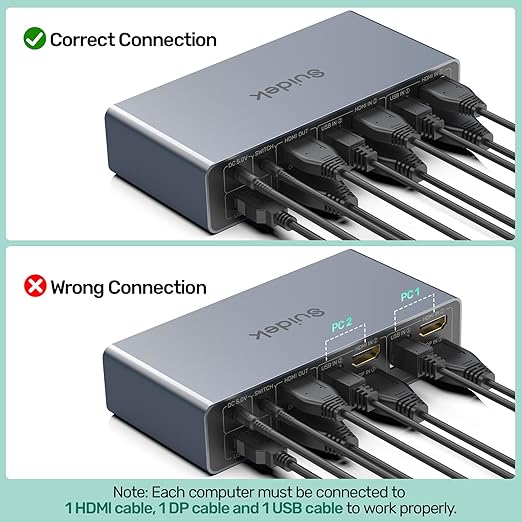
- Note: 1. HDMI connector input needs to be connected to HDMI connector output, DP connector input needs to be connected to DP connector output. 2. It is not recommended to use HDMI to DP conversion cable, or DP to HDMI conversion cable. 3. Please keep the 5V power adapter connected during use. Don't use any over 5V power adapter. 4. It is recommended to remove the protective film before use.5. Please make sure that HDMI/DP/USB IN are all connected to work properly.
- Package Content: 1 x USB HDMI+DP KVM Switch, 2 x USB A to B cable, 1 x Desktop Controller, 1 x DC 5V Power Adapter, 1 x User Manual. Please contact us if you have any questions before purchase or during use. We provide 24-hour customer-friendly support service.
Overview
- Operation Mode : ON-ON
- Current Rating : 2 Amps
- Operating Voltage : 5 Volts
- Contact Type : Normally Open
- Connector Type : Plug In
- Brand : SUIDEK
- Terminal : Pc
- Item dimensions L x W x H : 5.12 x 2.44 x 1.18 inches
- Circuit Type : 2-way
- Contact Material : Aluminum
- Switch TypePush Button : MaterialAluminum
- : Switch TypePush Button
- : MaterialAluminum
- Mounting TypeSurface Mount : Specification MetCE, FCC, UL
- : Mounting TypeSurface Mount
- : Specification MetCE, FCC, UL
Share